Arduino for Beginners: Build Your First Electronic Device
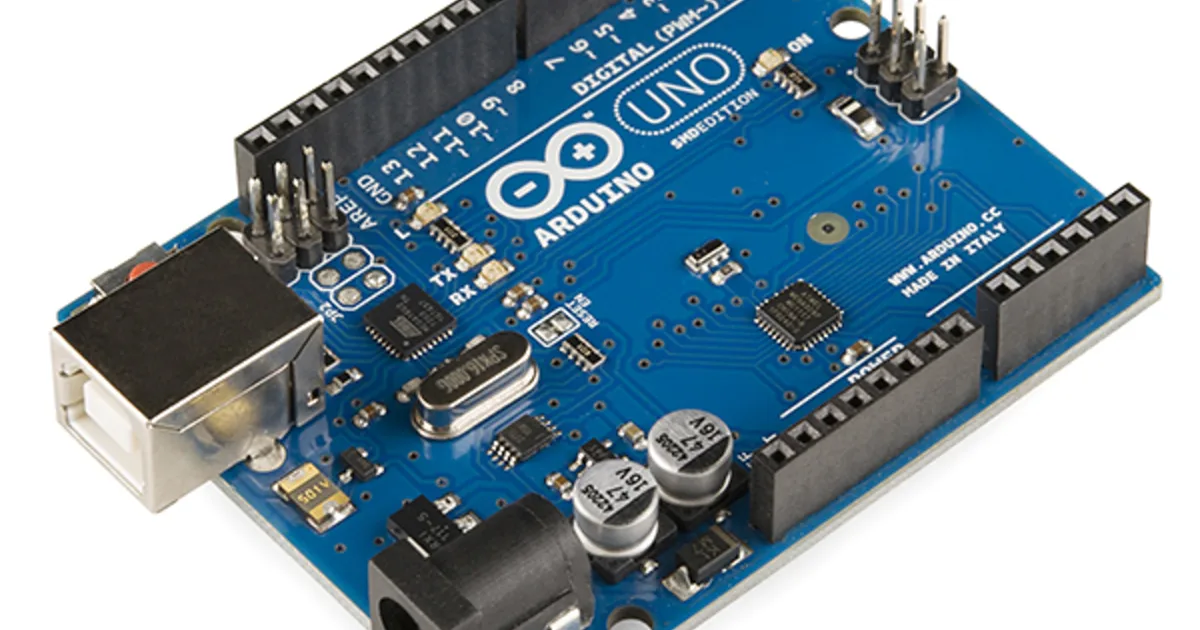
Arduino opened the world of electronics and hardware to everyone, from artists to engineers. It is an affordable, beginner-friendly platform for building physical devices that sense and respond to the world.
This guide introduces Arduino and how to build your first electronic project.
1. What Arduino Is
An Arduino is a small programmable circuit board, called a microcontroller, that reads inputs from sensors and controls outputs like lights and motors. Unlike a full computer, it does one job reliably, making it perfect for embedded electronics projects.
2. Getting Started
- Get a starter kit with a board, breadboard, and components.
- Install the free Arduino programming software.
- Connect the board to your computer over USB.
- Upload your first program to make an LED blink.
Blinking an LED is the hello world
The classic first project lights up an LED. It seems trivial, but it teaches the entire workflow of wiring, coding, and uploading that every project builds on.
3. How Projects Come Together
Arduino projects combine simple code with basic electronics. You wire components to the board, write a short program describing the behavior, and upload it. The board then runs your code continuously, reacting to sensors and driving outputs in real time.
4. Project Ideas to Grow
After blinking an LED, build a temperature display, a motion-triggered alarm, a small robot, or an automatic plant waterer. Each project introduces new sensors and concepts, steadily turning you from a beginner into a confident maker.
5. Key Takeaways
- Arduino is a beginner-friendly microcontroller platform.
- It reads sensors and controls outputs reliably.
- A starter kit and free software are all you need.
- Blinking an LED teaches the core build workflow.
- Projects grow from simple lights to robots and automation.